 |
FREE !!! |
|
|
|
FREE !!! |
|
*** Click Here to checkout the NEW OFFICIAL website for Monitor Dot! ***
10/24/22 - Story
behind this
app:
For a long time there was a popular app that was free to use by everyone. Then
recently the app suddenly displayed a message stating that a mandatory update
was required.
This update basically changed the app into a trial version that expired within
hours after installing it. To continue using the app, the company now wants a
monthly fee!
So, because they got greedy and
decided to screw over their users by disabling everyone's app without notice, I
decided to return the favor by creating my own app and giving it away for
FREE!*
Their loss, your gain.
...and please enjoy my
retro webpage design :)
Check out TechDoctorUK's review of VPN Monitor Dot:
How will VPN Monitor Dot help protect my Privacy?
VPN's help protect your privacy when you are on the internet. But they can only
do that when they are working properly.
Even if a VPN has it's "Auto-Start" feature enabled,
there is no guarantee that it will properly run 100% of the time when you power
on/bootup your device.
And even when a VPN is running properly, it may
suddenly disconnect or crash even hours later without giving you any warning!
This is why using VPN Monitor Dot
is so important
VPN Monitor Dot will continuously monitor your VPN connection and let you know it's working by displaying a status "Dot" in the top right corner of your screen...
When you ARE being protected by your VPN, the app will slowly flash a GREEN dot:
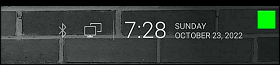
But when you are NOT being protected by your VPN (because the VPN is not turned on or it crashed), then the app will slowly flash a RED dot:

----- VPN Monitor Dot vs. the
"Other Guy's" app -----
1) Why does the "Other Guy's" app need
Read/Write Access Permission to my device's photo/files Storage?
I have no idea why the other app
needs it, but keep in mind
that because their
app also has internet access,
it could theoretically add/delete or
send your files to a remote cloud server without your knowledge or approval!
VPN Monitor Dot does not need this potentially dangerous permission
in order to fully protect you :)
2) VPN Monitor Dot was designed in a highly
efficient way to minimize it's memory/resource footprint.
Just see the
difference for
yourself:
|
The Other Guy's ---- vs. ---- VPN Monitor Dot APK
size: |
Size does matter, and being x100
TIMES
BIGGER is NOT a good thing!
Why is Smaller Better?
Because VPN Monitor Dot uses very little resources when running, it has a much higher chance of
staying loaded in memory whenever
Android decides to start killing processes to free up
resources.
That means VPN Monitor Dot will be able to stick around to help keep you protected.
The last thing you want is for your VPN to crash and never know it because the
monitoring app was killed!
IMPORTANT NOTES:
|
Installation:
|
Need additional help with installation?
Click here
for an easy tutorial from Troypoint.com!
Run codesign --verify --verbose /Applications/Apple\ Configurator.app in the Terminal. A secure installation will output a confirmation that the explicit software requirements are satisfied by Apple’s developer authority.
For IT administrators and device managers, the name Apple Configurator 2 (AC2) is practically a household term. It’s the comprehensive, free utility from Apple that enables large-scale deployment of iPhones, iPads, and Apple TVs. However, navigating the world of downloading, installing, and verifying the integrity of this tool can be confusing. This guide provides a definitive breakdown of obtaining the , installing it, mastering its advanced features, and exploring the concept of "Extra Quality."
Downloading software from unofficial sources carries significant risks. You could obtain outdated, modified, or malicious software. Stick to the official App Store whenever possible. apple configurator 2 dmg file download extra quality
The App Store downloads the latest version, which includes the Apple Configurator 2 application. It's automatically installed in your folder as Apple Configurator 2.app . This method guarantees you get the most recent, secure, and stable version directly from Apple.
– Use built-in macOS security features or trusted antivirus software to scan the downloaded ZIP file and extracted contents. It’s the comprehensive, free utility from Apple that
With the DMG mounted, he didn't have to wait for individual downloads for each iPad. He plugged in the first 30-port charging station. The "extra quality" wasn't just in the software’s build—it was in the workflow. Apple Configurator 2 recognized the hub instantly. He applied his custom "Literacy Project" blueprint.
Operational workflows and quality assurance You could obtain outdated, modified, or malicious software
Managing a fleet of Apple devices can be complex, but Apple Configurator 2 is the most reliable tool for the job. While you might find third-party DMG files online and phrases like "Extra Quality" in your searches, the is always the official version. Always prioritize downloading from the Mac App Store or your institution's secure software repository to ensure you have a trustworthy, functional, and fully-featured utility.
Restoring or reviving Apple Silicon Macs or bricked iOS devices.
Apple Configurator 2 is an essential utility for system administrators, IT professionals, and developers who need to configure and deploy iOS, iPadOS, tvOS, and visionOS devices at scale. Whether you need to refresh a cart full of iPads, configure specific security profiles, or revive a non-responsive Mac, Apple Configurator 2 provides the necessary granular control.
Apple Configurator 2 allows users to connect multiple devices to a Mac via USB and configure them with the precise settings, applications, and data required for students, employees, or customers. Key capabilities include: